
Cleaning Mode Source on GitHub
Cleaning Mode app icon: a white keycap with a blue sparkle and soap bubbles

Lock your keyboard. Wipe it clean.

A Mac menu bar app with one job. One click stops every key, so you can wipe the keyboard and nothing happens.

Free · Open source · macOS 14+

The app is not notarized yet. See how to open it the first time.

A wipe without Cleaning Mode, then with it. The lock cover counts each blocked press. Your mouse and trackpad still work.

A cloth on the keys types junk

Wipe the keyboard while the Mac is on, and each key you touch does something. Junk goes into the open window. Shortcuts fire. The volume and the brightness change. One bad press can close or delete your work.

You can turn the Mac off first, but that takes time. Cleaning Mode takes one click.
What one wipe can type into the open window.

How it works

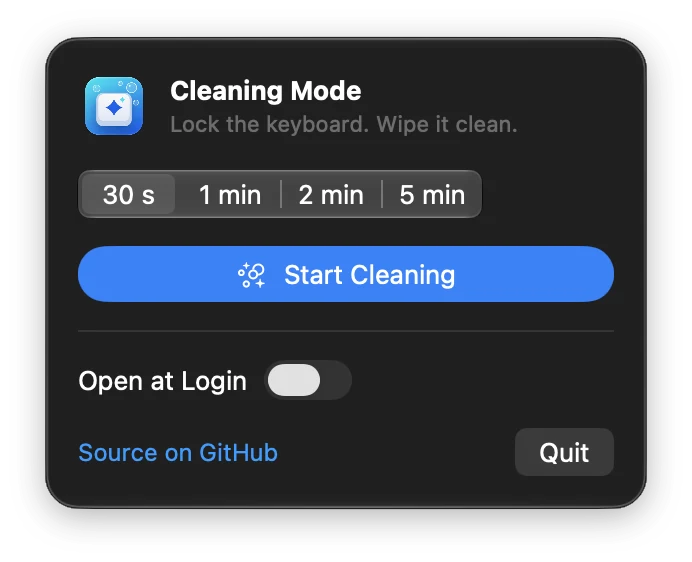
  1. Click the keyboard icon in the menu bar.
  2. Pick a time: 30 s 1 min 2 min 5 min. Then click Start Cleaning.
  3. Wipe. When you finish, click Done or let the timer run out. The keyboard works again.

While the lock is on, every key stops: letters, modifiers, Fn, the function row, and the media and brightness keys.

The Cleaning Mode menu bar popover: time options 30 s, 1 min, 2 min and 5 min, a blue Start Cleaning button, an Open at Login switch, a Source on GitHub link and a Quit button.

Safe by design

It counts presses. It does not record them.

  • It does not record or store what you press.
  • It counts presses in memory, only for the number on the cover.
  • It makes no network connections. It has no analytics.
  • It is MIT licensed. Read the source on GitHub.

Questions

How do I install it?
  1. Download the zip from GitHub Releases.
  2. Move Cleaning Mode to your Applications folder.
  3. Open it. The build is not notarized yet (there is no paid Apple Developer ID), so macOS blocks it the first time.
  4. Open System Settings, then Privacy & Security. Scroll down and click Open Anyway.
Why does it need Accessibility permission?

macOS requires this permission for an app that stops key presses. Cleaning Mode does not record or store what you press. It only counts presses, in memory, to show the number on the cover.

Can it block the power or Touch ID key?

No. This is the only key it cannot block. The key locks your Mac, so do not press it while you wipe.

Does it block Caps Lock?

Yes. If the Caps Lock state changes while you wipe, the app sets it back to how it was when the lock ends.

Which Macs does it run on?

macOS 14 Sonoma or later, on Apple silicon and Intel Macs.

Can I build it from source?

Yes. Clone the repository, open cleaning-mode.xcodeproj in Xcode, and run the cleaning-mode scheme.

git clone https://github.com/MULUALEM-TEKLE/cleaning-mode.git